CLICKRISKTrade Manager · clickrisktrade.com
MQL5 Market
Utilitaire MetaTrader 5MetaTrader 5 utility v1.00EN / FR

Cliquez votre stop-loss. Le lot suit votre risque. Click your stop-loss. The lot follows your risk.

ClickRisk Trade Manager place vos ordres à la souris : vous fixez le risque, vous cliquez le niveau du SL sur le graphique, l'EA calcule le lot, commission comprise. Ensuite il gère la suite : break-even, TP partiels, stop suiveur, limite de perte du jour et annonces économiques.

ClickRisk Trade Manager places your orders with the mouse: you set the risk, click the SL level on the chart, and the EA computes the lot, commission included. Then it manages the rest: break-even, partial TPs, trailing stop, daily loss limit and economic news.

EURUSD, M151 USD / point / lot Démo interactiveInteractive demo
CLICKRISK EURUSD 0.00
0.00
0.00 
SPREAD6 pts
0.00% / 5%
0.00%
USD
clickrisktrade.com v1.00
Bougez la souris sur le graphique pour placer le SL, cliquez pour simuler l'envoi.Touchez le graphique pour placer le SL et simuler l'envoi. Les boutons du panneau répondent aussi ; essayez Compte sans EA avec les opérations confirmées. Move the mouse over the chart to set the SL, click to simulate the order.Tap the chart to set the SL and simulate the order. The panel buttons respond too; try Account without EAs with confirmed operations. Illustration : compte de 10 000 USD, commission 7 USD par lot. Illustration: 10,000 USD account, 7 USD commission per lot.
1 clic1 clickLot calculéLot sizedVous cliquez le SL, le lot suit votre risque.You click the SL, the lot follows your risk.
TP1·TP2Sorties partiellesPartial exits50 % au TP1 avec le SL au BE, le reste au TP2.50% at TP1 with the SL at BE, the rest at TP2.
BEStop protégéProtected stopBreak-even à 1 R et stop suiveur automatiques.Automatic break-even at 1 R and trailing stop.
5 %Perte du jourDaily lossÀ la limite, les nouveaux ordres sont bloqués.At the limit, new orders are blocked.

Il exécute. Vous décidez.It executes. You decide.

Vous fixez le risque et cliquez le stop : ClickRisk calcule le lot, pose les niveaux sur le graphique et gère la sortie. Il n'ouvre jamais un trade de lui-même.

You set the risk and click the stop: ClickRisk sizes the lot, draws the levels on the chart and manages the exit. It never opens a trade on its own.

En actionIn action

Chaque geste, pas à pasEvery move, step by step

Sept animations du panneau et du graphique, du choix du risque jusqu'à la sortie du trade.

Seven animations of the panel and the chart, from picking the risk to the exit of the trade.

Le risque d'abordRisk first

Tapez un montant ou cliquez un risque prédéfini, en USD, en EUR ou en % du solde. Avec le R:R, la ligne de TP se place seule.

Type an amount or click a preset, in USD, EUR or % of balance. With the R:R, the TP line places itself.

50 USDpar défautby default
5risques prédéfinispresets
1:3R:R par défautdefault R:R

Le stop à la sourisStop-loss by mouse

Le SL suit le curseur, avec le lot et le risque réel, commission comprise. L'aimant l'accroche à la mèche. Un clic envoie l'ordre, Échap annule.

The SL follows the cursor, with the lot and the real risk, commission included. The magnet snaps it to the wick. One click sends the order, Esc cancels.

1 clic clickpour envoyerto send
12 pxportée de l'aimantmagnet reach
ÉchapEscpour annulerto cancel

Ordres en attentePending orders

En LIMITE ou STOP, cliquez l'entrée puis le SL : le lot suit la distance. Une alerte vous prévient quand l'ordre se déclenche.

In LIMIT or STOP, click the entry then the SL: the lot follows the distance. An alert tells you when the order fills.

  • MARCHÉ
  • LIMITE
  • STOP
  • MARKET
  • LIMIT
  • STOP

Break-even automatiqueAutomatic break-even

À 1 R de profit, le SL revient à l'entrée, décalé de la commission et du swap : une sortie au BE ne coûte rien.

At 1 R of profit, the SL comes back to the entry, offset by commission and swap: a BE exit costs nothing.

1 Rdéclenchementtrigger
autocommission + swap
0 clic clickà faireneeded

Sorties partiellesPartial exits

Cliquez TP1 puis TP2. Au TP1, l'EA ferme 50 % et met le SL au BE ; TP2 ferme le reste. Ou fermez 30, 50 ou 75 % d'un bouton.

Click TP1 then TP2. At TP1 the EA closes 50% and moves the SL to BE; TP2 closes the rest. Or close 30, 50 or 75% with one button.

  • FERMER 30% + BE
  • FERMER 50% + BE
  • FERMER 75% + BE
  • TP UNIQUE 100%
  • TP PARTIEL TP1/TP2
  • CLOSE 30% + BE
  • CLOSE 50% + BE
  • CLOSE 75% + BE
  • SINGLE TP 100%
  • PARTIAL TP1/TP2

Stop suiveurTrailing stop

En multiples du risque ou en points : il démarre à 1,5 R et suit le prix à 1 R, par pas de 0,1 R.

In multiples of the risk or in points: it starts at 1.5 R and trails the price 1 R behind, in steps of 0.1 R.

1,51.5 Rdépartstart
1 Rdistance
0,10.1 Rpas minimummin. step

Limites de risqueRisk limits

Perte du jour plafonnée, exposition, risque max par trade. Les annonces à fort impact arrivent avec un compte à rebours et peuvent bloquer les ordres.

Capped daily loss, exposure, max risk per trade. High-impact news comes with a countdown and can block orders.

  • PERTE DU JOUR 5 %
  • ANNONCE 8m
  • ALERTES OUI
  • BLOCAGE OUI
  • DAILY LOSS 5%
  • NEWS 8m
  • ALERTS ON
  • BLOCK ON

Animations d'illustration, données fictives. Le lot y est calculé comme dans l'EA : risque ÷ (distance du SL + commission). Les captures du vrai panneau sont plus bas, dans Fonctions.Illustrative animations, fictitious data. The lot is computed as in the EA: risk ÷ (SL distance + commission). Screenshots of the real panel are further down, in Features.

Les réglagesSettings

Tout se règle d'un clicEverything is one click away

Les boutons du panneau changent les réglages en direct. Les paramètres de l'EA, notés en bas de chaque carte, fixent les valeurs de départ.

The panel buttons change the settings live. The EA inputs, noted at the bottom of each card, set the starting values.

RisqueRisk

Montant fixe en USD ou en EUR, ou % du solde. Cinq risques prédéfinis, de 50 à 1 000 USD.

Fixed amount in USD or EUR, or % of balance. Five presets, from 50 to 1,000 USD.

InpRiskMode · InpRiskValue · InpRiskCurrency · InpRiskPresets

PlafondsCaps

Risque max / trade5 %
Exposition maxoff
Lot maxcourtier
Max risk / trade5%
Max exposureoff
Max lotbroker

Un ordre qui dépasserait un plafond ne part pas ; la barre d'état dit pourquoi.

An order that would break a cap is not sent; the status bar says why.

InpMaxRiskPercent · InpMaxExposure · InpMaxLot

Type d'ordreOrder type

Au marché, vous cliquez le SL. En attente, l'entrée, puis le SL.

Market: you click the SL. Pending: the entry, then the SL.

Bouton du panneauPanel button

Take profit

Ligne de TP au R:R pendant le placement : un aperçu par défaut, jointe à l'ordre si vous l'activez.

TP line at the R:R while you place the order: a preview by default, attached to the order if you turn it on.

InpRiskReward · InpSendRRTakeProfit

AimantMagnet

Le SL et l'entrée s'accrochent à la mèche la plus proche, au-delà du spread.

The SL and the entry snap to the nearest wick, beyond the spread.

InpMagnet · InpMagnetPixels · InpMagnetBuffer

OpérationsOperations

En mode confirmé : un bouton ENVOYER, et un 2e clic pour TOUT FERMER ou SUPPRIMER.

Confirm mode: a SEND button, and a 2nd click for CLOSE ALL or DELETE.

InpOneClickOps

Break-even

Au seuil, le SL passe à l'entrée, décalé de la commission et du swap.

At the trigger, the SL moves to the entry, offset by commission and swap.

InpUseBreakEven · InpMgmtUnit · InpBETriggerR · InpBEAutoOffset

Stop suiveurTrailing stop

départ 1.5 R · distance 1 R · pas 0.1 R

start 1.5 R · distance 1 R · step 0.1 R

Il suit le prix des positions gagnantes, en R ou en points.

It trails the price of winning positions, in R or in points.

InpUseTrailing · InpTrailStartR · InpTrailDistanceR · InpTrailStepR

TP1 / TP2

Cliquez TP1 puis TP2 sur le graphique. TP1 ferme sa part et met le SL au BE.

Click TP1 then TP2 on the chart. TP1 closes its share and moves the SL to BE.

InpTP1Percent

Perte du jourDaily loss

À la limite, plus de nouvel ordre. Le coupe-circuit ferme tout et bloque jusqu'au lendemain.

At the limit, no new order. The breaker closes everything and locks until tomorrow.

InpMaxDailyDrawdown · InpCircuitBreaker · InpCircuitScope

AnnoncesNews

alerte 10 min · blocage 2 / 2 min

alert 10 min · block 2 / 2 min

Calendrier MT5, deux devises du symbole. Compte à rebours dans l'en-tête du panneau.

MT5 calendar, both currencies of the symbol. Countdown in the panel header.

InpNewsBlock · InpNewsMinutesBefore · InpNewsAlertMinutes

Notifications

Ordre placé ou déclenché, SL ou TP touché : un message, avec la capture du graphique.

Order placed or filled, SL or TP hit: a message, with a chart screenshot.

InpSendPush · InpSounds · InpTakeScreenshots · InpTelegram

Journal

ce symbole · cet EA · tout le compte

this symbol · this EA · whole account

Taux de réussite, R moyen, espérance, facteur de profit, export CSV.

Win rate, average R, expectancy, profit factor, CSV export.

InpJournalScope

Thème et langueTheme and language

Un clic dans l'en-tête, retenu pour tous les graphiques. Taille réglée selon l'écran.

One click in the header, kept for every chart. Size set from the screen.

InpLanguage · InpTheme · InpUIScale

Prêt au premier lancementReady at first start

Les valeurs de départ sont déjà posées. Ce que vous changez dans le panneau (risque, R:R, aimant, stop suiveur, mode des opérations…) est gardé pour la suite.

The starting values are already set. What you change in the panel (risk, R:R, magnet, trailing, operation mode…) is kept for next time.
VidéoVideo

La démo complèteThe full demo

Du risque au journal, en 2 minutes : le clic sur le stop, les ordres en attente, le break-even, les TP partiels, le stop suiveur, les annonces avec leur alerte, les notifications sur téléphone et Telegram, et le mode réduit.

From the risk to the journal in 2 minutes: the stop-loss click, pending orders, break-even, partial TPs, trailing stop, news with their alert, phone and Telegram notifications, and mini mode.

Pas besoin de son : les légendes expliquent chaque étape.

No sound needed: captions explain each step.

FonctionsFeatures

Un panneau, quatre ongletsOne panel, four tabs

Chaque onglet correspond à un moment du trade : entrer, gérer, vous protéger, faire le bilan. Les libellés ci-dessous sont ceux du panneau.

Each tab matches a moment of the trade: enter, manage, protect yourself, review. The labels below are the panel's own.

Entrer au bon lot, sans calculEnter at the right lot, no maths

  • Risque en montant fixe (USD ou EUR) ou en % du solde : 50 USD par défaut, cinq risques prédéfinis de 50 à 1 000 USD.
  • Ordres au marché, LIMITE ou STOP : l'entrée et le SL se cliquent sur le graphique.
  • Lot calculé avec la commission, refusé s'il dépasse votre risque max, votre exposition ou votre marge libre.
  • Boîte risque/rendement et ligne de TP au R:R choisi pendant le placement.
  • Aimant : le SL s'accroche à la mèche la plus proche, au-delà du spread.
  • Compte qui refuse les EA : en opérations confirmées, le lot et le SL à saisir à la main s'affichent en direct.
  • Risk as a fixed amount (USD or EUR) or a % of balance: 50 USD by default, five presets from 50 to 1,000 USD.
  • Market, LIMIT or STOP orders: the entry and the SL are clicked on the chart.
  • Lot computed with the commission, refused if it breaks your max risk, your exposure or your free margin.
  • Risk/reward box and TP line at your R:R while you place the order.
  • Magnet: the SL snaps to the nearest wick, beyond the spread.
  • Account that refuses EAs: with confirmed operations, the lot and SL to enter by hand show live.
Boutons de l'ongletButtons of the tab
ACHATVENTEMARCHÉ · LIMITE · STOPAIMANT ACTIFTP AU R:R ACTIFBETOUT FERMERSUPPR. EN ATTENTEOPÉRATIONS EN UN CLICOPÉRATIONS CONFIRMÉES
BUYSELLMARKET · LIMIT · STOPMAGNET ONTP AT R:R ONBECLOSE ALLDELETE PENDINGONE CLICK OPERATIONSCONFIRM OPERATIONS

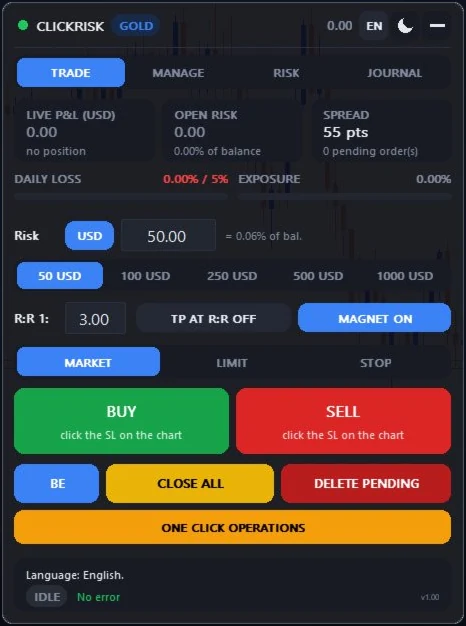
En haut de l'onglet : P&L latent en devise et en R, risque ouvert, spread, jauges de perte du jour et d'exposition.

At the top of the tab: live P&L in money and in R, open risk, spread, daily loss and exposure gauges.

Screenshot of the ClickRisk panel, TRADE tab, in MetaTrader 5
Le vrai panneau dans MetaTrader 5 (affiché en anglais)The real panel in MetaTrader 5

Prop firm ou serveur sans EAProp firm or server without EAs

L'EA n'a pas le droit de trader ? Il calcule quand même votre lot.The EA may not trade? It still sizes your lot.

Algo Trading coupé, mot de passe investisseur, ou compte dont le serveur refuse les ordres d'un EA : le panneau passe en ALGO INACTIF mais continue de calculer. En opérations confirmées, le bouton d'envoi devient la fiche de l'ordre à passer à la main, mise à jour à chaque tick.

Algo Trading off, investor password, or an account whose server refuses EA orders: the panel shows ALGO OFF but keeps computing. With confirmed operations, the send button becomes the ticket of the order to place by hand, updated on every tick.

  1. Cliquez OPÉRATIONS EN UN CLIC : il passe à OPÉRATIONS CONFIRMÉES.
  2. Cliquez ACHAT ou VENTE, puis le niveau du SL sur le graphique.
  3. Recopiez le lot et le SL dans la fenêtre d'ordre de MetaTrader 5 (F9), envoyez, puis Échap.
  1. Click ONE CLICK OPERATIONS: it turns to CONFIRM OPERATIONS.
  2. Click BUY or SELL, then the SL level on the chart.
  3. Copy the lot and the SL into the MetaTrader 5 order window (F9), send it, then press Esc.
Ce que vous lisez sur le graphiqueWhat you read on the chart EURUSD ALGO INACTIFALGO OFF MANUEL : ACHAT 0.26 lot | SL 1.08242 | 49.66 USD MANUAL: BUY 0.26 lot | SL 1.08242 | 49.66 USD

Le lot suit le prix en direct : lisez-le juste avant d'envoyer. Les contrôles restent actifs (plafond de risque, perte du jour, annonces).

The lot follows the price live: read it right before you send. The checks stay on (risk cap, daily loss, news).

AnnoncesNews

Calendrier MT5 intégréBuilt-in MT5 calendar

Les annonces des deux devises du symbole, avec une alerte 10 minutes avant puis à l'heure, que vous coupez d'un clic.

News of both currencies of the symbol, with an alert 10 minutes before, then on time, that you can mute in one click.

AlertesAlerts

Rien ne vous échappeNothing slips by

Ordre en attente déclenché, SL ou TP touché : fenêtre, son et notification push.

Pending order filled, SL or TP hit: popup, sound and push notification.

Telegram

Votre canal, avec capturesYour channel, with screenshots

Chaque nouvel ordre part sur Telegram avec une capture du graphique.

Every new order goes to Telegram with a chart screenshot.

InterfaceInterface

À votre façonYour way

Français ou anglais, thème clair ou sombre, textes larges et nets sur les écrans haute résolution, taille réglable.

French or English, light or dark theme, large text that stays sharp on high-DPI screens, adjustable size.

Centre d'aideHelp center

Installer, régler, traderInstall, set up, trade

Le guide suit l'ordre d'une première utilisation. Les noms en Inp… sont ceux de l'onglet Paramètres de l'EA.

The guide follows the order of a first use. Names in Inp… are those of the EA's Inputs tab.

Installation

Comptez cinq minutes. L'EA trade sur tout compte MetaTrader 5 qui autorise le trading algorithmique ; sur un compte qui le refuse, il sert de calculateur de lot (voir Saisie manuelle).

  1. Achetez ou louez l'EA sur le MQL5 Market, depuis le site ou depuis l'onglet Market de MetaTrader 5, connecté à votre compte MQL5.
  2. Ouvrez le Navigateur (Ctrl+N), dossier Expert Advisors › Market, et faites glisser ClickRisk Trade Manager sur le graphique du symbole à trader.
  3. Onglet Commun de la fenêtre qui s'ouvre : cochez « Autoriser le trading algorithmique ». Activez aussi le bouton Algo Trading de la barre d'outils.
  4. Onglet Paramètres : choisissez au minimum le mode de risque (InpRiskMode) et sa valeur (InpRiskValue). Le reste se règle aussi depuis le panneau.
  5. Validez. Le panneau s'affiche en haut à gauche du graphique ; le point vert de l'en-tête indique que le trading est autorisé.
Bon à savoirL'EA trade toujours le symbole de son graphique : pour plusieurs symboles, ouvrez un graphique par symbole. La langue et le thème choisis dans le panneau s'appliquent à tous les graphiques.
Vérifiez le risquePar défaut, le risque est de 50 USD par trade, plafonné à 5 % du solde. Réglez-le avant votre premier ordre.

Installation

It takes five minutes. The EA trades on any MetaTrader 5 account that allows algorithmic trading; on an account that refuses it, it works as a lot calculator (see Manual entry).

  1. Buy or rent the EA on the MQL5 Market, from the website or from the Market tab of MetaTrader 5, signed in to your MQL5 account.
  2. Open the Navigator (Ctrl+N), folder Expert Advisors › Market, and drag ClickRisk Trade Manager onto the chart of the symbol you trade.
  3. Common tab of the window that opens: tick “Allow Algo Trading”. Also turn on the Algo Trading button of the toolbar.
  4. Inputs tab: set at least the risk mode (InpRiskMode) and its value (InpRiskValue). Everything else can also be set from the panel.
  5. Confirm. The panel shows at the top left of the chart; the green dot in its header means trading is allowed.
Good to knowThe EA always trades the symbol of its chart: for several symbols, open one chart per symbol. The language and theme picked in the panel apply to all charts.
Check the riskBy default the risk is 50 USD per trade, capped at 5% of balance. Set it before your first order.

Passer un ordre au marché

Onglet ORDRES, type MARCHÉ.

  1. Choisissez le risque : tapez un montant ou cliquez un risque prédéfini (50, 100, 250, 500 et 1 000 USD par défaut, jusqu'à cinq valeurs avec InpRiskPresets). Le bouton USD passe en EUR ; le montant est converti dans la devise du compte au taux du marché.
  2. Cliquez ACHAT ou VENTE.
  3. Déplacez la souris jusqu'au niveau du stop-loss. L'étiquette affiche le lot, le risque réel (commission comprise) et la distance en points ; la boîte risque/rendement et la ligne de TP se dessinent en même temps.
  4. Cliquez : l'ordre part avec le lot calculé. Échap annule à tout moment.

Le TP

Par défaut, la ligne de TP au R:R n'est qu'un aperçu (non envoyé). Activez TP AU R:R ACTIF pour envoyer l'ordre avec ce TP. Mettez le R:R à 0 pour masquer la ligne.

Le mode confirmation

Le bouton OPÉRATIONS EN UN CLIC bascule en OPÉRATIONS CONFIRMÉES. Le clic fixe alors le SL sans envoyer : le bouton ENVOYER récapitule le sens, le lot et le risque, recalculés à chaque tick. Recliquez pour déplacer le SL, faites glisser la ligne du TP si besoin (ce TP est envoyé tel quel), puis appuyez sur ENVOYER. Dans ce mode, TOUT FERMER et SUPPR. EN ATTENTE demandent un 2e clic dans les 3 secondes.

L'aimant

Avec AIMANT ACTIF, le SL s'accroche à la mèche d'une bougie proche du curseur (12 pixels par défaut) et se place au-delà d'elle d'une marge égale au spread. L'étiquette du SL indique alors mèche.

Contrôles avant envoiAvant chaque ordre, l'EA vérifie le plafond de risque par trade, l'exposition maximale, la marge libre, le lot maximum, la limite de perte du jour et le blocage des annonces. Si un contrôle échoue, l'ordre ne part pas et la barre d'état du panneau dit pourquoi. Un risque prédéfini au-dessus du plafond est refusé de la même façon : sur un compte de 10 000 USD, le plafond de 5 % vaut 500 USD et le bouton 1000 USD est refusé.

Placing a market order

TRADE tab, MARKET type.

  1. Pick the risk: type an amount or click a preset (50, 100, 250, 500 and 1,000 USD by default, up to five values with InpRiskPresets). The USD button switches to EUR; the amount is converted to the account currency at the market rate.
  2. Click BUY or SELL.
  3. Move the mouse to the stop-loss level. The label shows the lot, the real risk (commission included) and the distance in points; the risk/reward box and the TP line are drawn at the same time.
  4. Click: the order goes out with the computed lot. Esc cancels at any time.

The TP

By default the TP line at the R:R is only a preview (not sent). Turn on TP AT R:R ON to send the order with that TP. Set the R:R to 0 to hide the line.

Confirm mode

The ONE CLICK OPERATIONS button switches to CONFIRM OPERATIONS. The click then sets the SL without sending: the SEND button sums up the side, the lot and the risk, computed again on every tick. Click again to move the SL, drag the TP line if needed (that TP is sent as is), then press SEND. In this mode, CLOSE ALL and DELETE PENDING need a 2nd click within 3 seconds.

The magnet

With MAGNET ON, the SL snaps to the wick of a candle near the cursor (12 pixels by default) and sits beyond it by a margin equal to the spread. The SL label then reads wick.

Checks before sendingBefore each order, the EA checks the risk cap per trade, the max exposure, the free margin, the max lot, the daily loss limit and the news block. If a check fails, the order is not sent and the panel's status bar says why. A preset above the cap is refused the same way: on a 10,000 USD account, the 5% cap is 500 USD and the 1000 USD button is refused.

Ordres en attente

  1. Choisissez LIMITE ou STOP : les boutons deviennent ACHAT LIMITE / VENTE LIMITE ou ACHAT STOP / VENTE STOP.
  2. Cliquez le bouton, puis cliquez le prix d'entrée sur le graphique.
  3. Cliquez le niveau du SL. Le lot est calculé sur la distance entre l'entrée et le SL.
OrdreEntrée par rapport au prix actuel
ACHAT LIMITEEn dessous
VENTE LIMITEAu-dessus
ACHAT STOPAu-dessus
VENTE STOPEn dessous

L'aimant s'applique aussi au prix d'entrée. Une alerte vous prévient quand l'ordre se déclenche (InpNotifyFills).

Pending orders

  1. Pick LIMIT or STOP: the buttons become BUY LIMIT / SELL LIMIT or BUY STOP / SELL STOP.
  2. Click the button, then click the entry price on the chart.
  3. Click the SL level. The lot is computed from the distance between the entry and the SL.
OrderEntry versus the current price
BUY LIMITBelow
SELL LIMITAbove
BUY STOPAbove
SELL STOPBelow

The magnet works on the entry price too. An alert tells you when the order fills (InpNotifyFills).

Prop firm ou serveur sans EA : la saisie manuelle

Quand l'EA ne peut pas envoyer d'ordre, il continue de calculer le lot. Le mode OPÉRATIONS CONFIRMÉES vous donne alors, en direct, l'ordre exact à passer à la main.

Trois cas mettent l'EA dans cette situation : le bouton Algo Trading est coupé, le compte est ouvert avec le mot de passe investisseur, ou le serveur refuse les ordres des EA, ce que font certaines prop firms. L'en-tête du panneau affiche alors ALGO INACTIF, avec un point orange.

  1. Cliquez OPÉRATIONS EN UN CLIC : il passe à OPÉRATIONS CONFIRMÉES.
  2. Cliquez ACHAT ou VENTE, puis le niveau du SL. Le bouton d'envoi affiche par exemple MANUEL : ACHAT 0.26 lot | SL 1.08242 | 49.66 USD. Il se met à jour à chaque tick ; un clic sur le graphique déplace le SL.
  3. Ouvrez la fenêtre d'ordre de MetaTrader 5 (F9) ou le trading en un clic : volume = le lot affiché, Stop Loss = le SL affiché. Ajoutez le TP lu sur la ligne de TP si vous le voulez.
  4. Envoyez l'ordre depuis MetaTrader 5, puis appuyez sur Échap pour effacer les lignes de l'EA.
Bon à savoirEn mode montant fixe, le lot ne dépend pas du solde : si votre firme interdit d'attacher un EA au compte, vous pouvez lire le lot sur un compte démo du même courtier, avec la commission de votre compte réel dans InpCommissionPerLot. Le plafond de risque, la perte du jour et le blocage des annonces restent vérifiés avant l'affichage du lot.
Ce que l'EA ne fera pas sur ce compteSans droit de trader, l'EA ne peut ni déplacer le SL au BE, ni suivre le prix avec le stop suiveur, ni fermer au TP1. Gérez la position dans MetaTrader 5, et vérifiez le règlement de votre firme avant d'installer un EA sur le compte.

Prop firm or server without EAs: manual entry

When the EA cannot send orders, it keeps computing the lot. The CONFIRM OPERATIONS mode then gives you, live, the exact order to place by hand.

Three cases put the EA in this situation: the Algo Trading button is off, the account is opened with the investor password, or the server refuses EA orders, as some prop firms do. The panel header then shows ALGO OFF, with an orange dot.

  1. Click ONE CLICK OPERATIONS: it turns to CONFIRM OPERATIONS.
  2. Click BUY or SELL, then the SL level. The send button shows for example MANUAL: BUY 0.26 lot | SL 1.08242 | 49.66 USD. It updates on every tick; a click on the chart moves the SL.
  3. Open the MetaTrader 5 order window (F9) or one-click trading: volume = the lot shown, Stop Loss = the SL shown. Add the TP read on the TP line if you want one.
  4. Send the order from MetaTrader 5, then press Esc to clear the EA's lines.
Good to knowIn fixed amount mode, the lot does not depend on the balance: if your firm forbids attaching an EA to the account, you can read the lot on a demo account of the same broker, with your real account's commission in InpCommissionPerLot. The risk cap, the daily loss and the news block are still checked before the lot is shown.
What the EA won't do on this accountWithout the right to trade, the EA cannot move the SL to BE, trail the price or close at TP1. Manage the position in MetaTrader 5, and check your firm's rules before installing an EA on the account.

Gérer les positions

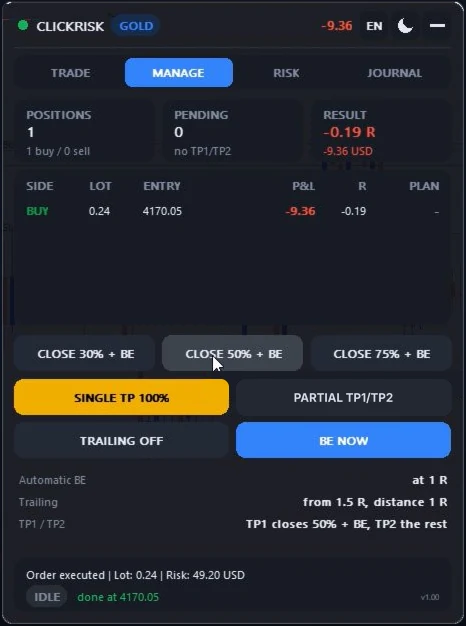
Onglet GESTION. 1 R est le risque initial du trade : la distance entre l'entrée et le SL à l'ouverture.

FERMER 30% + BE50%75%
Ferme cette part de chaque position gagnante, puis place son SL au point mort.
TP UNIQUE 100%
Cliquez un niveau sur le graphique : toutes les positions en profit s'y fermeront entièrement.
TP PARTIEL TP1/TP2
Cliquez TP1, puis TP2. À TP1, l'EA ferme 50 % (InpTP1Percent) et place le SL au point mort ; TP2 ferme le reste. Recliquez le bouton pour retirer le plan.
STOP SUIVEUR ACTIF
Active ou coupe le stop suiveur sur les positions gagnantes. Par défaut il démarre à 1,5 R et suit à 1 R de distance.
BE MAINTENANT
Ramène tout de suite le SL des positions gagnantes au point mort. Le bouton BE de l'onglet ORDRES fait la même chose.

Break-even automatique

Actif par défaut à 1 R de profit. Le SL n'est pas posé pile sur l'entrée : il est décalé de la commission (entrée et sortie) et du swap, pour qu'une sortie au BE ne vous coûte rien.

Gardez MetaTrader 5 ouvertLe BE automatique, le stop suiveur et la fermeture au TP1 sont exécutés par l'EA. Ils ne fonctionnent que si le terminal tourne avec l'EA sur le graphique. Le SL, et le TP2 quand le courtier l'accepte, restent chez le courtier.

Managing positions

MANAGE tab. 1 R is the initial risk of the trade: the distance between the entry and the SL at the open.

CLOSE 30% + BE50%75%
Closes that share of every profitable position, then moves its SL to break-even.
SINGLE TP 100%
Click a level on the chart: every position in profit will fully close there.
PARTIAL TP1/TP2
Click TP1, then TP2. At TP1 the EA closes 50% (InpTP1Percent) and moves the SL to break-even; TP2 closes the rest. Click the button again to remove the plan.
TRAILING ON
Turns the trailing stop on or off for profitable positions. By default it starts at 1.5 R and trails 1 R behind.
BE NOW
Moves the SL of the profitable positions to break-even right away. The BE button of the TRADE tab does the same.

Automatic break-even

On by default at 1 R of profit. The SL is not set exactly on the entry: it is offset by the commission (entry and exit) and the swap, so an exit at BE costs you nothing.

Keep MetaTrader 5 openThe automatic BE, the trailing stop and the TP1 close are run by the EA. They only work while the terminal runs with the EA on the chart. The SL, and TP2 when the broker accepts it, stay with the broker.

Limites de risque

Onglet RISQUE.

Perte du jour
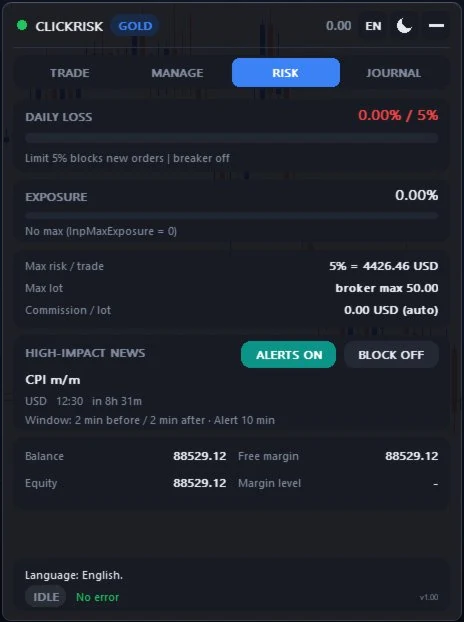
Comptée depuis minuit, heure du serveur, positions ouvertes comprises. À 5 % (InpMaxDailyDrawdown), les nouveaux ordres sont bloqués.
Coupe-circuit
Désactivé par défaut (InpCircuitBreaker). Au seuil choisi, il ferme tout et bloque les nouveaux ordres jusqu'au lendemain. Portée au choix : cet EA sur ce symbole, cet EA sur tous les symboles, ou tout le compte. Un trait sur la jauge marque son seuil.
Exposition
Risque total des positions et des ordres en attente, en % du solde. Avec un maximum (InpMaxExposure), un ordre qui le dépasserait est refusé.
Risque max par trade, lot max, commission
5 % du solde par défaut ; lot max du courtier ; commission détectée automatiquement ou saisie à la main.
Prop firmsRéglez la perte du jour et le coupe-circuit un peu en dessous des limites de votre firme : elle peut calculer sa perte journalière autrement (heure de remise à zéro, solde ou fonds propres de référence).

Risk limits

RISK tab.

Daily loss
Counted from midnight, server time, open positions included. At 5% (InpMaxDailyDrawdown), new orders are blocked.
Circuit breaker
Off by default (InpCircuitBreaker). At the chosen trigger it closes everything and locks new orders until the next day. Scope: this EA on this symbol, this EA on all symbols, or the whole account. A mark on the gauge shows its trigger.
Exposure
Total risk of positions and pending orders, in % of balance. With a maximum (InpMaxExposure), an order that would exceed it is refused.
Max risk per trade, max lot, commission
5% of balance by default; broker's max lot; commission detected automatically or typed in.
Prop firmsSet the daily loss and the circuit breaker a little below your firm's limits: it may compute its daily loss differently (reset time, balance or equity as the reference).

Annonces économiques

L'EA lit le calendrier économique de MetaTrader 5 pour les deux devises du symbole (EUR et USD sur EURUSD). Seules les annonces à fort impact sont suivies, sauf si vous activez InpNewsMedium.

  • L'onglet RISQUE affiche la prochaine annonce et son compte à rebours ; dans l'heure qui précède, le badge ANNONCE 12m apparaît dans l'en-tête.
  • BLOCAGE OUI bloque les nouveaux ordres de 2 minutes avant à 2 minutes après l'annonce (réglable).
  • Une alerte part 10 minutes avant puis à l'heure : fenêtre et son, push, Telegram. Elle n'est envoyée qu'une fois, même avec l'EA sur plusieurs graphiques.
  • Le bouton ALERTES OUI / ALERTES NON, à côté du blocage, coupe ou réactive ces alertes. Le choix vaut pour tous les graphiques du terminal et reste mémorisé.
  • Les heures s'affichent à l'heure de votre PC (InpNewsLocalTime) ou à celle du serveur.

Economic news

The EA reads the MetaTrader 5 economic calendar for both currencies of the symbol (EUR and USD on EURUSD). Only high-impact news is tracked, unless you turn on InpNewsMedium.

  • The RISK tab shows the next news and its countdown; within the hour before, the NEWS 12m badge shows in the header.
  • BLOCK ON blocks new orders from 2 minutes before to 2 minutes after the news (adjustable).
  • An alert goes out 10 minutes before, then on time: popup and sound, push, Telegram. It is sent once, even with the EA on several charts.
  • The ALERTS ON / ALERTS OFF button, next to the block, mutes or restores these alerts. The choice applies to every chart of the terminal and is remembered.
  • Times show in your PC time (InpNewsLocalTime) or in server time.

Journal

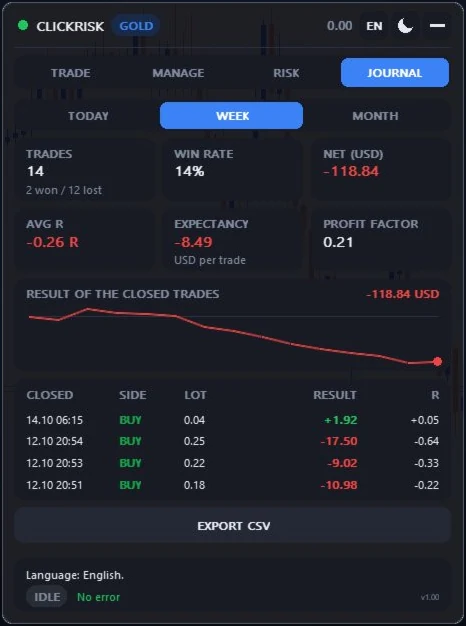
Choisissez AUJOURD'HUI, SEMAINE ou MOIS. Le journal affiche le taux de réussite, le R moyen, l'espérance par trade, le facteur de profit, la courbe du résultat et les derniers trades fermés.

EXPORTER CSV enregistre les trades de la période dans le dossier MQL5/Files. Pour le trouver : Fichier › Ouvrir le dossier des données.

Le paramètre InpJournalScope choisit les trades comptés : cet EA sur ce symbole (par défaut), cet EA sur tous les symboles, ou tout le compte.

Journal

Pick TODAY, WEEK or MONTH. The journal shows the win rate, average R, expectancy per trade, profit factor, the result curve and the latest closed trades.

EXPORT CSV saves the trades of the period in the MQL5/Files folder. To find it: File › Open Data Folder.

The InpJournalScope input picks the trades counted: this EA on this symbol (default), this EA on all symbols, or the whole account.

Notifications et Telegram

Notifications push

Dans MetaTrader 5 : Outils › Options › Notifications, cochez « Activer les notifications push » et saisissez votre MetaQuotes ID. Vous le trouvez dans l'application mobile MetaTrader 5, rubrique Messages.

Telegram

  1. Dans Telegram, ouvrez @BotFather, envoyez /newbot et suivez les étapes. Copiez le token qu'il vous donne.
  2. Envoyez un premier message à votre nouveau bot, sinon il ne pourra pas vous écrire. Récupérez votre chat id, par exemple avec @userinfobot. Pour un groupe ou un canal : ajoutez le bot comme administrateur et utilisez l'id du groupe (il commence par -).
  3. Dans MetaTrader 5 : Outils › Options › Expert Advisors, cochez « Autoriser WebRequest pour les URL listées » et ajoutez https://api.telegram.org.
  4. Dans les paramètres de l'EA : InpTelegram = true, collez InpTelegramToken et InpTelegramChatId. InpTelegramPhoto joint une capture du graphique aux messages des nouveaux ordres.
Erreur 4014Si le panneau affiche « Telegram : autorisez https://api.telegram.org », l'étape 3 manque.

Notifications and Telegram

Push notifications

In MetaTrader 5: Tools › Options › Notifications, tick “Enable Push Notifications” and enter your MetaQuotes ID. You find it in the MetaTrader 5 mobile app, in the Messages section.

Telegram

  1. In Telegram, open @BotFather, send /newbot and follow the steps. Copy the token it gives you.
  2. Send a first message to your new bot, or it won't be able to write to you. Get your chat id, for example with @userinfobot. For a group or channel: add the bot as an admin and use the group id (it starts with -).
  3. In MetaTrader 5: Tools › Options › Expert Advisors, tick “Allow WebRequest for listed URL” and add https://api.telegram.org.
  4. In the EA inputs: InpTelegram = true, paste InpTelegramToken and InpTelegramChatId. InpTelegramPhoto attaches a chart screenshot to the messages of new orders.
Error 4014If the panel shows “Telegram: allow https://api.telegram.org”, step 3 is missing.

FAQ

Le panneau affiche ALGO INACTIF ou « Trading désactivé (terminal ou EA) ».The panel shows ALGO OFF or “Trading disabled (terminal or EA)”.

Activez le bouton Algo Trading de la barre d'outils. Puis ouvrez les propriétés de l'EA (F7), onglet Commun, et cochez « Autoriser le trading algorithmique ». Si le panneau dit « Ce compte n'accepte pas les ordres d'un EA », c'est le compte ou son serveur qui refuse : passez par la saisie manuelle.

Turn on the Algo Trading button of the toolbar. Then open the EA properties (F7), Common tab, and tick “Allow Algo Trading”. If the panel says “This account does not accept orders from an EA”, the account or its server refuses them: use manual entry.

« LOT SOUS LE MINIMUM » : pourquoi l'ordre ne part pas ?“LOT BELOW THE MINIMUM”: why is the order not sent?

Avec ce risque et cette distance de SL, le lot calculé est plus petit que le lot minimum du courtier. Rapprochez le SL de l'entrée ou augmentez le risque.

With this risk and this SL distance, the computed lot is smaller than the broker's minimum lot. Move the SL closer to the entry or raise the risk.

« Risque … au-dessus du plafond ».“Risk … above the cap”.

Le risque dépasse InpMaxRiskPercent (5 % du solde par défaut). Exemple : sur 10 000 USD, le bouton 1000 USD est refusé car le plafond est de 500 USD. Baissez le risque par trade, ou relevez ce plafond si c'est voulu.

The risk is above InpMaxRiskPercent (5% of balance by default). Example: on 10,000 USD, the 1000 USD button is refused because the cap is 500 USD. Lower the risk per trade, or raise that cap if you mean it.

« PAS DE TAUX DE CONVERSION – patientez ».“NO CONVERSION RATE YET – wait a second”.

Votre risque est en USD ou en EUR mais le compte est dans une autre devise : l'EA attend le prix de la paire de conversion. Réessayez après une seconde. Si le message reste, ajoutez la paire de conversion dans l'Observation du marché.

Your risk is in USD or EUR but the account uses another currency: the EA is waiting for the price of the conversion pair. Try again after a second. If the message stays, add the conversion pair to the Market Watch.

Le BE et le stop suiveur marchent-ils terminal fermé ?Do the BE and the trailing stop work with the terminal closed?

Non. Ils sont gérés par l'EA, comme la fermeture au TP1 : gardez MetaTrader 5 ouvert, sur votre PC ou sur un VPS, avec l'EA sur le graphique. Le SL, et le TP2 quand le courtier l'accepte, restent chez le courtier.

No. They are run by the EA, like the TP1 close: keep MetaTrader 5 open, on your PC or on a VPS, with the EA on the chart. The SL, and TP2 when the broker accepts it, stay with the broker.

Puis-je l'utiliser sur plusieurs symboles ?Can I use it on several symbols?

Oui, avec un graphique par symbole. Gardez le même numéro magique (InpMagic) si vous voulez que le coupe-circuit et le journal regroupent tous les symboles.

Yes, with one chart per symbol. Keep the same magic number (InpMagic) if you want the circuit breaker and the journal to group all symbols.

Les comptes cents sont-ils pris en charge ?Are cent accounts supported?

Oui. Les comptes en USC et EUC sont reconnus : un risque de 100 USD reste 100 USD, et non 100 cents.

Yes. USC and EUC accounts are recognised: a 100 USD risk stays 100 USD, not 100 cents.

La démo affiche « Calendrier indisponible dans le testeur ».The demo shows “Calendar not available in the tester”.

C'est normal : le testeur de stratégie de MetaTrader 5 n'a pas accès au calendrier économique. Les annonces fonctionnent sur un graphique normal.

That's expected: the MetaTrader 5 strategy tester has no access to the economic calendar. News works on a normal chart.

Comment couper les alertes d'annonces ?How do I mute the news alerts?

Onglet RISQUE, carte des annonces : cliquez ALERTES OUI, il passe à ALERTES NON. Les alertes sont coupées sur tous les graphiques ; le compte à rebours et le blocage des ordres continuent de fonctionner.

RISK tab, news card: click ALERTS ON, it turns to ALERTS OFF. Alerts are muted on every chart; the countdown and the order block keep working.

Les notifications push n'arrivent pas.Push notifications don't arrive.

Vérifiez Outils › Options › Notifications : la case « Activer les notifications push » doit être cochée et votre MetaQuotes ID saisi. Le bouton « Test » de cette fenêtre envoie un message d'essai.

Check Tools › Options › Notifications: “Enable Push Notifications” must be ticked and your MetaQuotes ID entered. The “Test” button of that window sends a test message.

Puis-je l'utiliser chez une prop firm ?Can I use it with a prop firm?

Oui. L'EA est un assistant de trading manuel : vous décidez de chaque ordre. Réglez la perte du jour et le coupe-circuit un peu en dessous des limites de la firme. Si elle refuse les ordres des EA, gardez l'EA comme calculateur : en OPÉRATIONS CONFIRMÉES, il affiche en direct le lot et le SL à saisir à la main (voir Saisie manuelle). Vérifiez toujours son règlement sur les EA.

Yes. The EA is a manual trading assistant: you decide every order. Set the daily loss and the circuit breaker a little below the firm's limits. If it refuses EA orders, keep the EA as a calculator: with CONFIRM OPERATIONS, it shows the lot and the SL to enter by hand, live (see Manual entry). Always check its rules on EAs.

Contact et supportContact and support

Réponse sous 24 à 48 heures ouvrées, en français ou en anglais.

Reply within 24 to 48 business hours, in French or English.

Acheteurs MQL5MQL5 buyers

Messagerie MQL5MQL5 messages

Écrivez-moi depuis mon profil vendeur. C'est le canal le plus rapide si vous avez acheté ou loué l'EA.

Write to me from my seller profile. It's the fastest channel if you bought or rented the EA.

Ouvrir mon profil MQL5Open my MQL5 profile
Email

Par emailBy email

Pour une question avant achat, une capture lourde ou un fichier CSV du journal.

For a pre-sale question, a large screenshot or a journal CSV file.

support@clickrisktrade.com

Préparez votre messagePrepare your message

Remplissez ces champs, copiez le texte, puis collez-le dans la messagerie MQL5 ou dans un email. Joignez une capture du panneau et les lignes de l'onglet Experts (Boîte à outils, Ctrl+T).

Fill in these fields, copy the text, then paste it into MQL5 messages or an email. Attach a screenshot of the panel and the lines of the Experts tab (Toolbox, Ctrl+T).